Nexus AI · AI for window and door fabricators

Just ask. Nexus AI draws it. You build it.

Nexus AI is the artificial intelligence in Endades Nexus. You ask it to do the job as you would a colleague — by voice, with a photo or with the customer's sketch — and it prepares it inside your Nexus, with your systems, your customers and your rates.

Optional in Nexus Infinity. From your phone, tablet or computer. If it doesn't know something, it asks.

Nexus AI On site

By voice“Two-sash tilt and turn, 1500 by 1200, in white.”

Which customer is it for?

“For Smith.”

Draft ready: 2-sash tilt and turn, 1500 × 1200, in white. Shall I add it to the quote?

“Yes.”

✓ Window added to the quote.

A window requested by voice, as in the first scene of the video.

Nexus AI in 90 seconds

A window by voice, a façade from a photo and a pergola from a sketch on a napkin. Illustrated and silent: everything is labelled on screen.

Animation with real screenshots of the window configurator, Nexus Clad and Nexus Shade.

Say it. Show it. Send it.

Requests come in every form: a call from site, a photo of the façade, a hand-drawn sketch. Before, someone had to key them into the software; with Nexus AI, you send them over just as they are.

01 · Say it

A window, by voice

“Two-sash tilt and turn, 1500 by 1200, in white.”

Nexus AI builds it with the same calculation as the configurator — profiles, cuts, hardware and a glass unit that fits — asks you for anything missing, such as the customer, and adds it to the quote, priced with your rates. It also handles sliders, lift-and-slide, bi-folds and fixed windows with mullions and transoms.
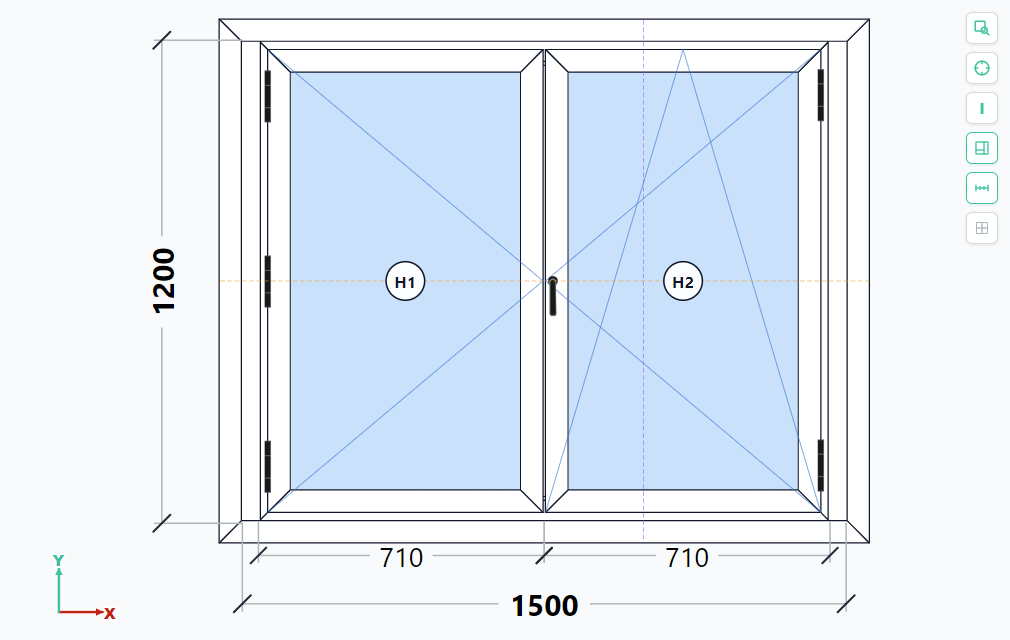
Two-sash tilt and turn window, 1500 × 1200 mm, in the Endades Nexus 2D configurator, with its dimensions
The window from the video, in the Nexus configurator.
02 · Show it

A façade, from a photo

“Prepare the ventilated façade for this building.”

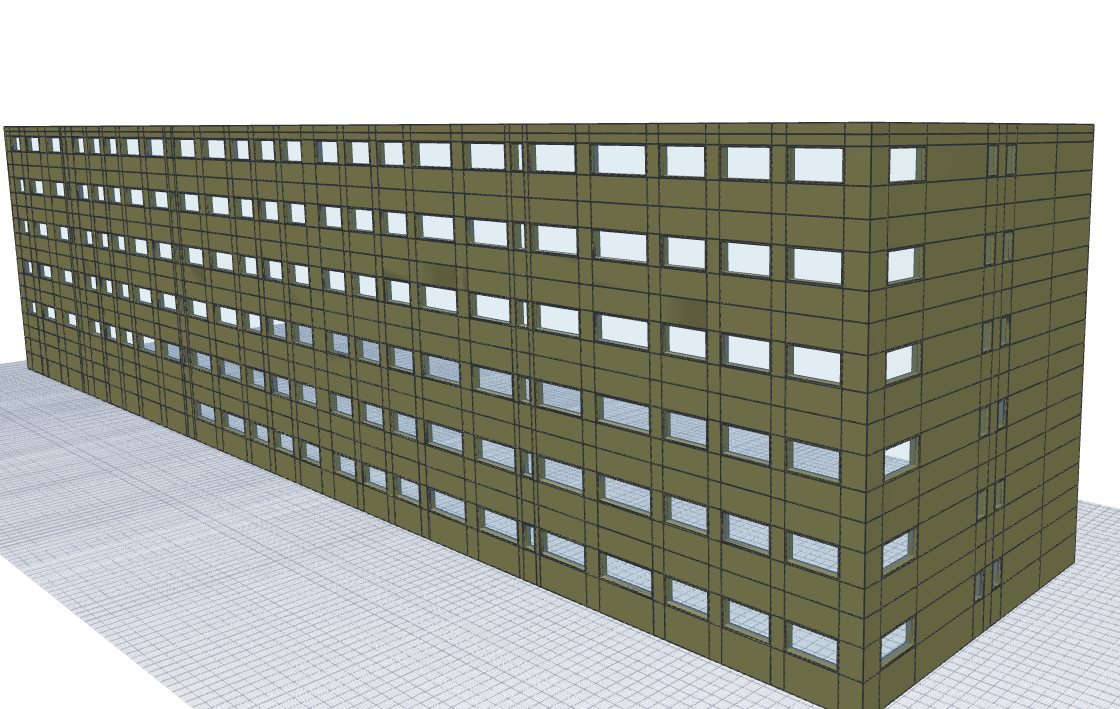
From photos of the façades, Nexus AI counts floors and openings, fills in the building record and sets it up in Nexus Clad. The measurements come out marked as estimated so you can confirm them on site; if you already know the cladding, it goes into the quote already priced.

Residential building clad in ventilated façade panels, in the Nexus Clad 3D view
A building clad in Nexus Clad.
03 · Send it

A pergola, from a sketch

“Add a pergola for this to the quote.”

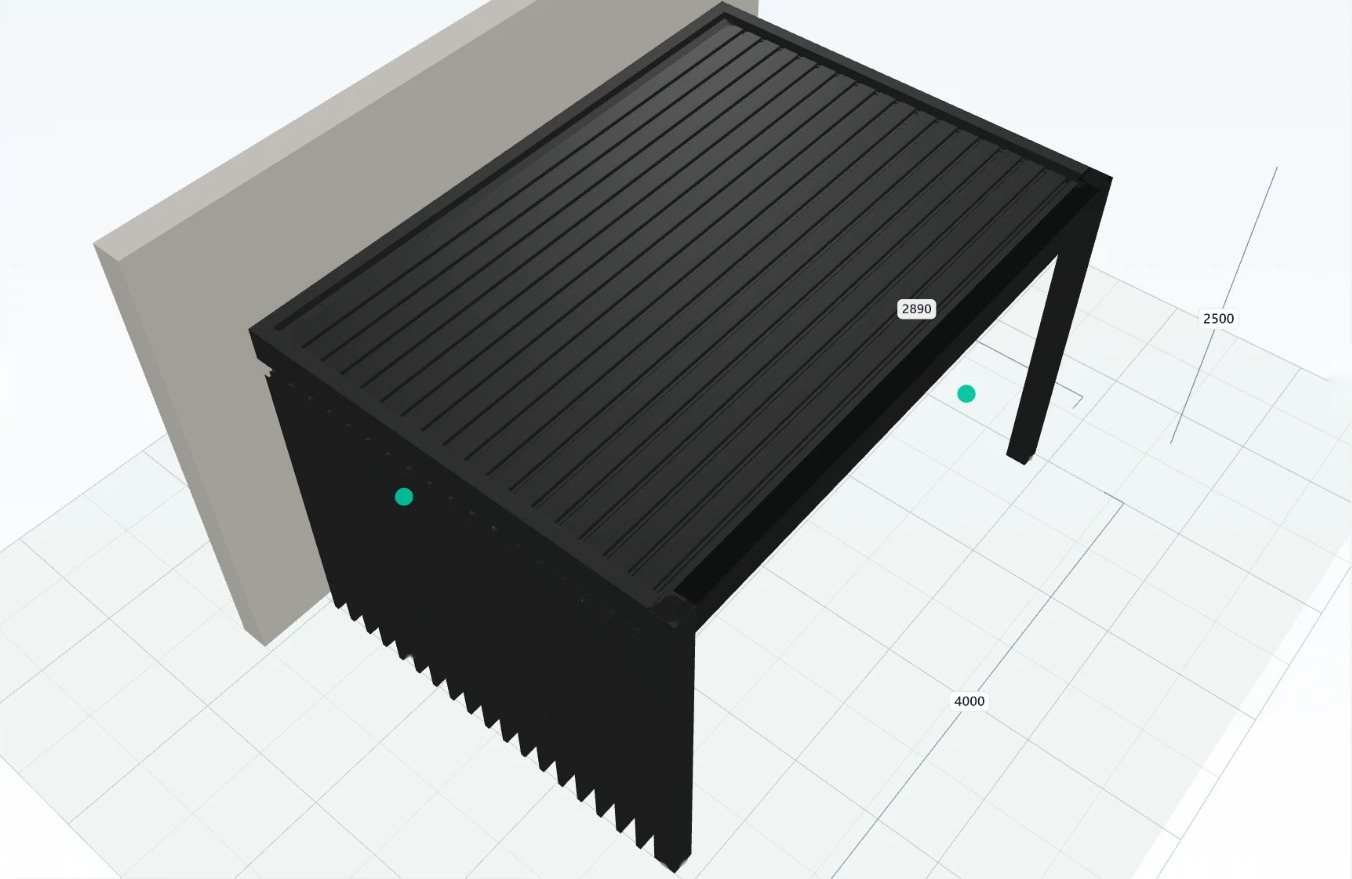
From the sketch or a photo of the space, Nexus AI picks the Nexus Shade system, suggests dimensions and options, and asks about whatever the drawing doesn't say: is it wall-mounted? If it can't be priced, it doesn't add anything.

Wall-mounted bioclimatic pergola with adjustable louvres and a louvred side closure, in the Nexus Shade 3D view
A wall-mounted pergola in Nexus Shade.

Façades use Nexus Clad, and pergolas and awnings use Nexus Shade: two optional modules of Endades Nexus. See Nexus Clad · See Nexus Shade

And the day-to-day work, too

Whatever you'd do on screen, you can ask it to do. Nexus AI searches before it creates anything, so nothing gets duplicated, and when it's done it gives you the link to the record so you can review it.

Quotes

From the customer's PDF to the quote

“Make a quote from this PDF.”

It reads the order or the site survey, finds each position in your catalogue, your gallery or your systems, and asks about anything that doesn't match. Or dictate the whole quote in one sentence; when it's done, it gives you the PDF.

Customers

A customer from their business card

“Create the customer on this card.”

It reads the card, checks by name and tax ID that the customer doesn't already exist, and creates it with its contact person. It also imports customers and suppliers from an Excel file.

Purchasing

Incoming goods, from a photo of the delivery note

“This has arrived, book it in.”

It matches the carrier's delivery note against outstanding orders, shows you the differences and generates the purchase delivery note. If you tell it where, it assigns the location and the goods go into stock.

Warehouse

A rack count, from a photo

“This is rack 6, do the count.”

It recognises each profile by its cross-section, counts the bars by length and shows you what it counted against what was on record. With your approval, it adjusts the stock.

Queries

Ask it about your data

“Which purchase orders haven't been received yet?”

It searches customers, projects, quotes, orders, delivery notes and invoices, and gives you the amounts on a quote or an order without opening the PDF.

Help

How it's done, with the link

“How do I turn a quote into an order?”

It explains it with the Nexus manual and takes you to the screen with a direct link — only to the screens each user is allowed to open.

You decide. Nexus AI gets it ready.

An AI that works inside your ERP has to be cautious. Nexus AI is, by design.

A draft before creating anything

Before creating a customer, a project or a quote, it checks the data, duplicates and anything missing. If it's unsure, or it has read the data from a photo or a PDF, it asks you before saving.

If it doesn't know, it asks

It doesn't make up references, dimensions or amounts. Whatever it can't work out, it asks you all at once, in a short list.

With your permissions

Everyone uses it with their own: Nexus AI only does what that person can do on screen, with the same rules and the same locks.

Everything is logged

Every query and every change is recorded: who, what, when and with what result. When it's done, it gives you the link to review it.

What Nexus AI doesn't do

  • It doesn't delete anything
  • It doesn't create or modify invoices
  • It doesn't touch anything recorded in Verifactu
  • It doesn't send anything to production
  • It doesn't touch documents in production or open by someone else

If there's something it can't do, it tells you where to do it in Nexus, with the link to the screen.

Frequently asked questions

What is Nexus AI?

It is the artificial intelligence in Endades Nexus. You ask it to do the job by voice, in writing, with a photo or with a document, and it prepares it inside your Nexus, with your systems, your customers and your rates.

Which edition is it in?

Nexus AI is an optional module of Nexus Infinity. It is not sold separately from Endades Nexus. See the editions.

Where can I use it from?

From your phone, tablet or computer: by typing, dictating or attaching a photo or a PDF. On site, in the showroom or in the office.

Can it mess up my data?

Nexus AI doesn't delete anything, doesn't invoice and doesn't send anything to production. Before creating any record it prepares a draft, checks for duplicates and asks about anything it doesn't know, and it can only do what the person using it can do on screen.

Can I manufacture from measurements taken from a photo?

No. Measurements taken from a photo are estimates, and Nexus AI marks them as such. Confirm them on site before manufacturing.

Who in my company can use it?

Your company's users, each with their own permissions. By default, querying data and creating records is reserved for administrators; asking how to do something in Nexus is open to everyone.

Do I need Nexus Clad or Nexus Shade?

Only for what they cover: ventilated façades need Nexus Clad, and pergolas and awnings need Nexus Shade. Nexus AI works with the modules your licence includes.

Is there a record of what it does?

Yes. Every query and every change is logged: who, what, when and with what result. And when it's done, Nexus AI gives you the link to the record so you can review it.

What would you ask Nexus AI to do?

We'll show you Nexus AI with your own cases: the windows, façades or pergolas that reach you today by phone, as photos or on paper.

Nexus AI robot
  • ✓With your own examples, no strings attached.
  • ✓Nexus AI is optional in Nexus Infinity: we'll explain what each edition includes.
  • ✓If you already work with Endades Nexus, we'll tell you how to add it.

Request a Nexus AI presentation

Tell us what you'd like to ask it, and we'll show it to you in action.